Paychex Alternatives
Paychex is one of the largest HRIS and payroll solutions in the market. It started in 1971, mainly as a payroll solutions provider, but later expanded to have modules for employee benefits, human capital management (HCM), HR services, employee benefits, and professional employer organization (PEO) services.
Who Should Use Paychex?
Paychex is recommended for mid-size businesses in the healthcare, non profit, and construction industries that need easy and efficient payroll, tax filing, and HRIS reporting. The software has a range of solutions depending on your business size, from self-employed, all the way to 1,000+ employees. Plans to choose from include: Paychex Flex Essentials, Paychex Flex Select, and Paychex Flex Pro.
Paychex aims to make payroll processing simple for managers and employees. They provide an easy online payroll solution and allow for different options for employees to receive their wages. Depending on the plan, employees can opt to receive their pay via direct deposit, pay cards, and pay per check.
The platform also helps with tax filing and remitting garnishments to appropriate agencies. It also has a general ledger functionality that allows businesses to upload payroll-related ledger data into their accounting software.
Beyond tax filing, Paychex also offers extensive HRIS tools. Within the platform, users can gain access to all kinds of HR forms and policy documentation. More advanced features like employee handbook functionality, onboarding essentials, and employee screening tools are available in higher-tier plans.
Where Paychex Can Fall Short
Payroll and HRIS are Paychex’s core strengths. It’s a reliable option for mid-sized organizations that need structured payroll processing and compliance support. However, there are several limitations that tend to surface once teams rely on the platform more day to day—particularly for businesses managing hourly teams, multiple locations, or tight labor margins.
-
Workforce Management Capabilities: Paychex is fundamentally a payroll-first platform, with workforce management features added over time. As a result, its time tracking and employee scheduling tools remain relatively basic. Businesses with more complex scheduling needs or high-volume hourly teams may find these features insufficient for day-to-day operations.
-
Labor Forecasting: While Paychex offers workforce management features, its labor forecasting capabilities are relatively limited compared to more specialized platforms. Forecasting tools may not fully incorporate key demand drivers such as real-time sales data, foot traffic, seasonality, or external variables. For businesses that rely on precise labor planning, this can make it harder to accurately align staffing with demand or proactively control labor costs, often resulting in more manual or reactive scheduling processes.
-
Reporting: Reporting features within Paychex are limited and sometimes difficult to use, especially when it comes to tracking labor spend and attendance across multiple locations. User reviews mentioned that reporting within Paychex is not very intuitive nor customizable enough for operations of scale.
-
Not a True All-in-One System: Although Paychex offers a wide range of modules, the platform is not always fully unified. Different features (such as payroll, time tracking, and HR tools) can feel disconnected, leading to a fragmented user experience. In some cases, support teams are also segmented by module, which can make resolving cross-functional issues more time-consuming.
-
Pricing Transparency & Unexpected Costs: A common concern among users is pricing predictability. Businesses may initially purchase a package expecting it to meet their needs, only to find that additional modules or services are required. Over time, costs can increase due to expiring discounts, add-on features, or fees for services like tax filings and year-end forms. This can make long-term budgeting more difficult compared to platforms with more transparent, all-inclusive pricing.
-
Support Experience: Some users report inconsistent support experiences, particularly as Paychex has expanded its global support operations. Response times and issue resolution can vary, and in more complex cases, resolving issues across multiple modules may require coordination between different teams. For businesses that rely heavily on timely payroll and workforce operations, this can create friction.
-
User Experience & Usability: Ease of use is another common concern. Some users report that the platform is not always intuitive, particularly when onboarding new employees or navigating between modules. The overall experience can feel less streamlined compared to more modern, unified systems.
Alternative Platforms
While Paychex undoubtedly has its strengths, the few shortcomings of the system could lead many to seek out alternative or partner systems with which to enhance their operations even more. If any of the limitations listed above are simply non-negotiables, here’s a roster of some Paychex alternatives you might consider:
#1 Workforce.com
While Paychex’s core strength lies in payroll and HRIS, many of its limitations stem from workforce management, particularly in scheduling, forecasting, reporting, and day-to-day operational visibility.
Workforce.com is designed to solve exactly these challenges.
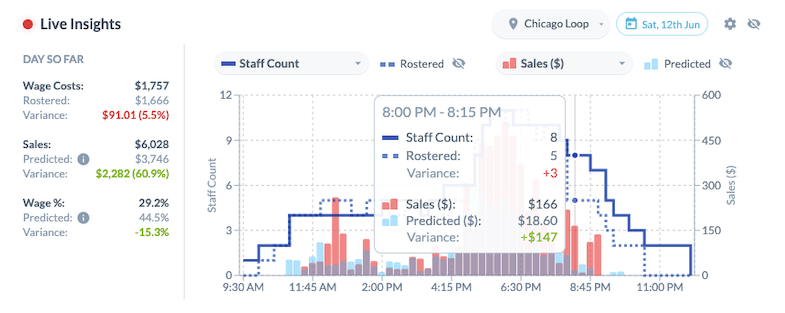 Unlike Paychex, which was built around payroll and later expanded into other modules, Workforce.com is purpose-built for managing hourly teams—bringing scheduling, time tracking, payroll, and HR into a single, unified system.
For businesses that need tighter control over labor costs, better visibility into operations, and a more seamless user experience, Workforce.com offers a more complete alternative.
Here are some of the key reasons why Workforce.com is the best Paychex Flex alternative:
-
Purpose-Built Workforce Management: Workforce.com is designed specifically for hourly and shift-based teams, rather than layering workforce tools onto a payroll system. This results in more powerful scheduling, time tracking, and operational workflows that better support real-world frontline needs.
-
Advanced Labor Forecasting & Demand-Based Scheduling: Workforce.com uses historical data, sales trends, foot traffic, weather, and other demand drivers to generate highly accurate schedules. Managers can proactively control labor costs instead of reacting after the fact.
-
Real-Time Visibility Into Labor Costs: Workforce.com connects scheduling directly to labor spend, allowing managers to see the cost of schedules before they’re published. Real-time alerts help prevent overtime and keep teams aligned with budget targets.
-
True All-in-One Platform: Workforce.com combines workforce management, payroll, and HR in a single system with shared data across all modules. This eliminates the need to switch between tools or manage disconnected systems.
-
Transparent, All-Inclusive Pricing: All core features are included within Workforce.com’s plans, with no hidden add-ons for essential functionality. This makes it easier for businesses to predict costs and scale without unexpected pricing changes.
-
Easy and Custom Reporting: Workforce.com makes it easy to build and customize reports across locations, roles, and metrics—without exporting data or relying on manual processes. This gives operators immediate access to the insights they need.
-
Intuitive, Mobile-First Experience: The platform is designed for ease of use across both managers and frontline staff. Employees can clock in, swap shifts, request time off, and view schedules from a simple mobile interface—reducing admin overhead and improving adoption.
-
Labor Compliance: Workforce.com’s scheduling and timekeeping are mapped to an extensive wage and hour compliance engine, dramatically limiting your exposure to lawsuits and fines. The system accounts for labor laws across all 50 states, automatically addressing things like minor rules, overtime calculations, and rest break standards.
Workforce.com Pricing: Built for ROI
Workforce.com offers two pricing plans for mid-market to enterprise-sized clients, both designed to maximize ROI. Depending on the plan selected, you gain full access to the features presented and any subsequent features rolled out. There are no extra fees or expensive add-ons hidden within the plans.
You’ll need to contact Workforce.com directly for more information on pricing.
To really explore the platform and decide for yourself, book a call today to find out more about Workforce.com and its features.
#2 Workday
Workday is an online HCM suite with HRIS, talent management, and financial management solutions. Like Paychex, Workday has been in the market for quite some time.
Key features
-
Adaptive planning
-
Large-scale HCM and payroll
-
Financial management system
-
Sourcing and inventory management
Use cases
-
Enterprise and large organizations
-
IT, computer software
Pricing
-
Quote-based
Workday is a good option for enterprise organizations or companies with more than 1,000 employees because it has an extensive feature suite that can address the nuances and intricacies of managing a large business.
However, their complex feature suite may be too much and unnecessary for smaller businesses that are looking for an intuitive and user-friendly platform that they can implement and adopt faster. Paychex would be the better choice for payroll and HR if you're a smaller organization.
#3 Paycom
Paycom is a software solution for core HR functions and payroll for mid-sized companies to enterprise-level businesses.
Key features
-
Enhanced background checks™
-
Applicant tracking system
-
Payroll tax management
-
Time clocks
-
Employee self-service tool for payroll
Use cases
-
Mid-sized to enterprise-level businesses needing to process and track large amounts of data such as training, employment status, and tax information
-
Large-scale documentation and tracking of employee information such as trainings, tax, and benefits
-
Automation of talent acquisition processes and employee self-service tools for payroll
Pricing
-
Quote-based
As a payroll and HR management solution, Paycom is worth considering as an alternative to Paychex. It can handle large amounts of data relevant to payroll and employment. But on the WFM side, Paycom is limited in tracking real-time sales vs. labor, and managers can’t see the cost of a schedule before it’s published.
#4 Gusto
Gusto is software for payroll, hiring, onboarding, and talent management.
Key features
-
HR and tax compliance
-
Insurance and benefits management
-
Gusto wallet app
-
Simple and easy payroll
Use cases
-
Marketing and advertising, SaaS, IT, accounting
-
SMEs requiring a system to automate onboarding and payroll
Pricing
-
Simple: $49 per month plus $6 per person
-
Plus: $80 per month plus $12 per person
-
Premium: $180 per month plus $22 per person
Gusto and Paychex are both suitable for SMEs for payroll management. However, Gusto’s employee scheduling capabilities and other features for workforce management are relatively lightweight. Many businesses rely on third-party integrations to fill these gaps.
Paychex offers a broader suite of HR and workforce tools, including employee scheduling and time tracking. That said, its WFM capabilities are still limited compared to dedicated platforms, particularly when it comes to real-time visibility and proactive labor optimization.
For scaling or operations-heavy businesses, a common approach is to use Paychex or Gusto for payroll and HR, and integrate a dedicated workforce management platform for scheduling and labor control. Alternatively, some teams choose to adopt a more specialized platform that combines payroll, scheduling, and labor management in one system.
#5 ADP
ADP is another large HR and payroll offering different products for specific business sizes. Their product line includes: ADP Run (Small), ADP Workforce Now (Midsize), and ADP Vantage (Enterprise).
Key features
-
Payroll solutions for different business sizes
-
Time tracking and scheduling for small businesses
-
Tax calculations and management
-
Insurance and benefits administration
-
Absence management
Use cases
-
Healthcare, non-profit, and IT
-
Handling large quantities of payroll and HR metrics
-
Gaining detailed insight into HRIS analytics
-
Basic workforce management for small businesses
Pricing
-
Quote-based
ADP and Paychex are both large payroll and HR providers with solutions tailored to different business sizes, making them comparable in this regard. When it comes to workforce management, ADP offers time tracking and basic scheduling tools, particularly for smaller businesses, but its capabilities vary by product and are not as advanced as those found in dedicated WFM platforms.
To create a more seamless workflow between HR, payroll, and workforce management, many businesses choose platforms that combine full-service payroll with labor forecasting, time tracking, and demand-based scheduling in a single system.
#6 BambooHR
BambooHR is a platform for managing every stage in the employee lifecycle. It has tools for onboarding, compensation, and culture building.
Key features
-
Applicant tracking system (ATS)
-
Onboarding
-
Employee experience tools
-
Performance management
-
Basic payroll
Use cases
-
Marketing and advertising, computer software businesses, non-profit
-
SMB human resources and payroll
Pricing
-
Quote-based
BambooHR is more user-friendly than Paychex, but its payroll functionalities are more basic than Paychex's. If you have straightforward payroll needs, BambooHR can be a good alternative to Paychex, but if you have more specific needs, Paychex may be the better choice.
However, BambooHR workforce management and payroll capabilities are limited. While it includes time tracking, it may not be as robust when it comes to labor forecasting, demand-based scheduling, and advanced payroll. If your business relies on those features, a specialized solution like Workforce.com is a better fit.
.
#7 Quickbooks Payroll
QuickBooks offers a full suite of solutions under Intuit, including payroll, time tracking, and accounting.
Key features
-
Tax penalty protection
-
Same-day direct deposit
-
Automated payroll
-
Automated tax computations and forms
-
App-based time tracking
-
Employee self-service portal
-
Invoicing
-
Synchronization across all QuickBooks products
Use cases
-
Project-based small businesses
-
Job costing
-
Construction, engineering, trade, and IT
Pricing
-
Payroll Core: $50 per month plus $6.50 per employee per month
-
Payroll Premium: $88 per month plus $10 per employee per month
-
Payroll Elite: $134 per month plus $12 per employee per month
QuickBooks is comparable to Paychex due to its extensive tax and payroll capabilities. Where Quickbooks has the edge though, is with smaller trade businesses, or with businesses already using other QuickBooks products.
However, QuickBooks has limitations when it comes to payroll reporting. Customizing reports can be restrictive, often requiring users to export data to tools like Excel for more flexibility. Its reporting interface can also be less intuitive, which can make it harder to quickly analyze payroll data. These limitations are worth considering for businesses that rely heavily on reporting and insights to manage payroll effectively.
#8 Rippling
Paycor is another SaaS that offers solutions for payroll, HR management, and basic workforce management.
Key features
-
HR management
-
Payroll
-
IT Management
-
Benefits administration
-
Expense management
-
PEO
Use cases
-
Tech startups
-
Small to medium businesses
-
Remote teams
-
Professional and consulting services
Pricing
-
Quote-based
Rippling combines HR, payroll, and IT management, which makes it appealing for SMBs, startups, and remote teams. It also offers additional IT features like device provisioning and software management, setting it apart from Paychex, which is primarily focused on payroll and compliance.
Paychex is known for supporting larger businesses and industries with its traditional HR and payroll services, while Rippling often stands out among smaller companies for their HR and IT integrations and modular pricing.
How we evaluated Paychex Alternatives
To identify the top Paychex alternatives, we evaluated each platform based on what actually matters in real payroll workflows—accurate pay runs, compliance, reliable reporting, and the ability to support growing teams and more demanding operations.
-
Payroll Accuracy & Automation: How reliably the platform processes payroll, including calculations, deductions, tax filings, and more complex scenarios like role-based pay, overtime rules, and work hour thresholds.
-
Compliance & Tax Management: Support for federal, state, and local compliance, including wage laws, overtime regulations, and automated tax filings.
-
Ease of Use: How intuitive the platform is for admins and employees, from setup to running payroll.
-
Reporting & Reconciliation: The ability to generate clear, customizable reports and reconcile payroll data without relying on manual workarounds.
-
Scalability: How well the platform supports growing teams, multiple locations, and more complex pay structures, including hourly workforces with varying roles, rates, and schedules.
-
Support for Day-to-Day Operations: Whether the platform supports time tracking, employee data flow, and visibility into labor-related workflows.
-
Integrations & Ecosystem: Compatibility with accounting, benefits, and other essential business systems.
-
Pricing & Transparency: Overall cost, pricing clarity, and how well the platform delivers value at different stages of growth.