
Technology
Tip Pools in Workforce.com: How It Works
By Jana Reserva
Oct. 6, 2026
Tips are an important part of pay for many hourly teams, especially in service industries. But when tips are shared across a team, figuring out who gets what can quickly become a manual process.
Every business may handle tip pooling differently. Some split tips based on hours worked, while others use percentages, points, or different rules for different teams and shifts. The challenge is applying those rules consistently every time tips are distributed.
Customers running tip-heavy operations already know this pain. Third Space Brewing, a Milwaukee craft brewery, moved away from a tip spreadsheet they’d been using for “years and years.”
That’s what Tip Pools in Workforce.com is built to handle.
Split tips your way
No two operations split tips the same way. A quick-service counter may have very different rules from a full-service restaurant with a bar. Tip Pools gives you the flexibility to distribute tips based on how your business operates
Here’s what you can do:
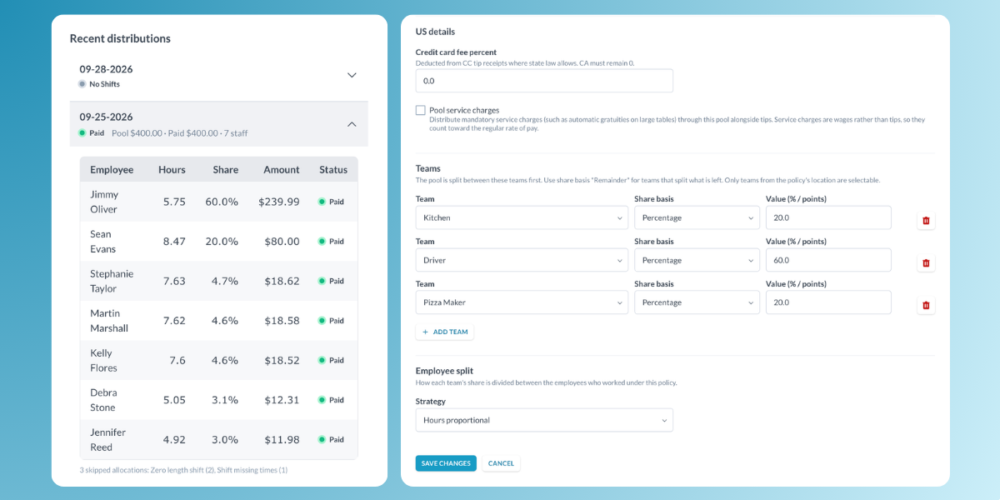
- Choose your pooling period: Split tips daily, weekly, or by pay period.
- Use different split strategies: Allocate a fixed percentage to one team, such as 30% to the bar, then split the remainder using points or hours worked.
- Create separate pools for different shifts: Run lunch and dinner pools side by side so tips go to the employees who worked those shifts.
- Handle different tip types: Track cash tips, credit card tips, and service charges separately so each can be taxed and reported appropriately.
Also read: Should You Implement Tip Pooling? Pros, Cons, and Best Practices for Restaurants
Build compliance into the process
Calculating the split is only part of managing a tip pool. You also need to account for who can participate, which fees can be deducted, and how each distribution was calculated.
Tip Pools helps build those requirements into the process:
- Managers are automatically excluded from tip pools, removing the need to check eligibility manually.
- Credit card processing fees can be handled based on state rules. Where permitted, they can be passed through to the tip pool; in states such as California, where this isn’t allowed, the deduction is blocked.
- Every calculation is recorded, giving you a clear record of how tips were distributed for each period.
From POS to paycheck
Tips can flow into Workforce.com automatically as a daily total through your POS integration, or you can add them directly.
Workforce.com calculates each employee’s share as tips are added, keeping it up to date if receipts or shifts change, then adds it to their timesheet and carries it into the next pay run.
That means the process can move from POS → tip pool → timesheet → payroll without having to calculate and transfer tip amounts between separate spreadsheets and systems.
Already using Tip Jars?
You can move a location to Tip Pools at any time. Historic Tip Jar data stays intact, and other locations can stay on Tip Jars while you switch over at your own pace. A location moves over in one step, so once you create a pool for it, that location’s tips run through the pool going forward.
Reach out to our support team whenever you’re ready to make the switch.
Getting started
For a closer look and detailed steps to setting up teams, shift groups, pooling rules, and payroll, check out our Tip Pools help guide.
Curious how Tip Pools fit into the bigger picture? Book a demo to see how tip pooling works alongside scheduling, time and attendance, and payroll in one system.
Schedule, engage, and pay your staff in one system with Workforce.com.